Changelog
-
Netlify’s security and compliance document library has moved into the Netlify Dashboard. To request access and learn more about the certifications and documents available, go to https://www.netlify.com/trust-center/.
Any signed-in user, on any plan, can view our certifications, subprocessor list, and available compliance documents from their user settings.
More sensitive documents, such as our SOC 2 report, require an access request through the Trust Center in the Netlify dashboard. Once approved, the documents are available for download.
Learn more about how to access the Netlify Trust Center in our Security docs.
-
Every site created with Agent Runners now includes Open Graph tags. When you share a link to your site, it shows up as a proper preview instead of a bare URL.
Social media sites and messaging apps read Open Graph tags to build link previews. Now, when you or your visitors share a site you created with Agent Runners, the preview includes a screenshot of the site, its title, and a description. That makes your site easier to recognize, more inviting to click, and look better than ever from the moment you share it.
This is available on all public sites created with Agent Runners. You don’t need to do anything to turn it on.
Learn more about Agent Runners in the Agent Runners docs.
-
OpenAI’s GPT-6.1 Sol model is now available through Netlify’s AI Gateway and Agent Runners with zero configuration required.
Use the OpenAI SDK directly in your Netlify Functions without managing API keys or authentication. AI Gateway handles everything automatically. Here’s an example using GPT-6.1 Sol with the Responses API:
import OpenAI from 'openai';export default async () => {const openai = new OpenAI();const response = await openai.responses.create({model: 'gpt-6.1-sol',input: 'Give a concise explanation of how AI works.',});return Response.json(response);};GPT-6.1 Sol is also available across Scheduled Functions, Background Functions, and Edge Functions. You get automatic access to Netlify’s caching, rate limiting, and authentication infrastructure.
Learn more in the AI Gateway documentation and Agent Runners documentation.
-
Agent Runners now shows you a preview right next to your prompt.
Previously, you’d get a link to the Deploy Preview and have to open it in a separate tab to see what the agent changed. Now the preview appears inline, so you can review the result and write your next prompt without switching back and forth. Plus, you can still access the Deploy Preview link if you need it.
This makes iterating with an agent feel more like a conversation. See what changed, spot what’s off, and follow up with the next instruction, all in one view.
Example flow
For example, say you’re building a strategic task organizer and prompt your agent to add a button that generates a quarterly impact report. Now you can watch your agent’s updates in the side preview next to your prompt.
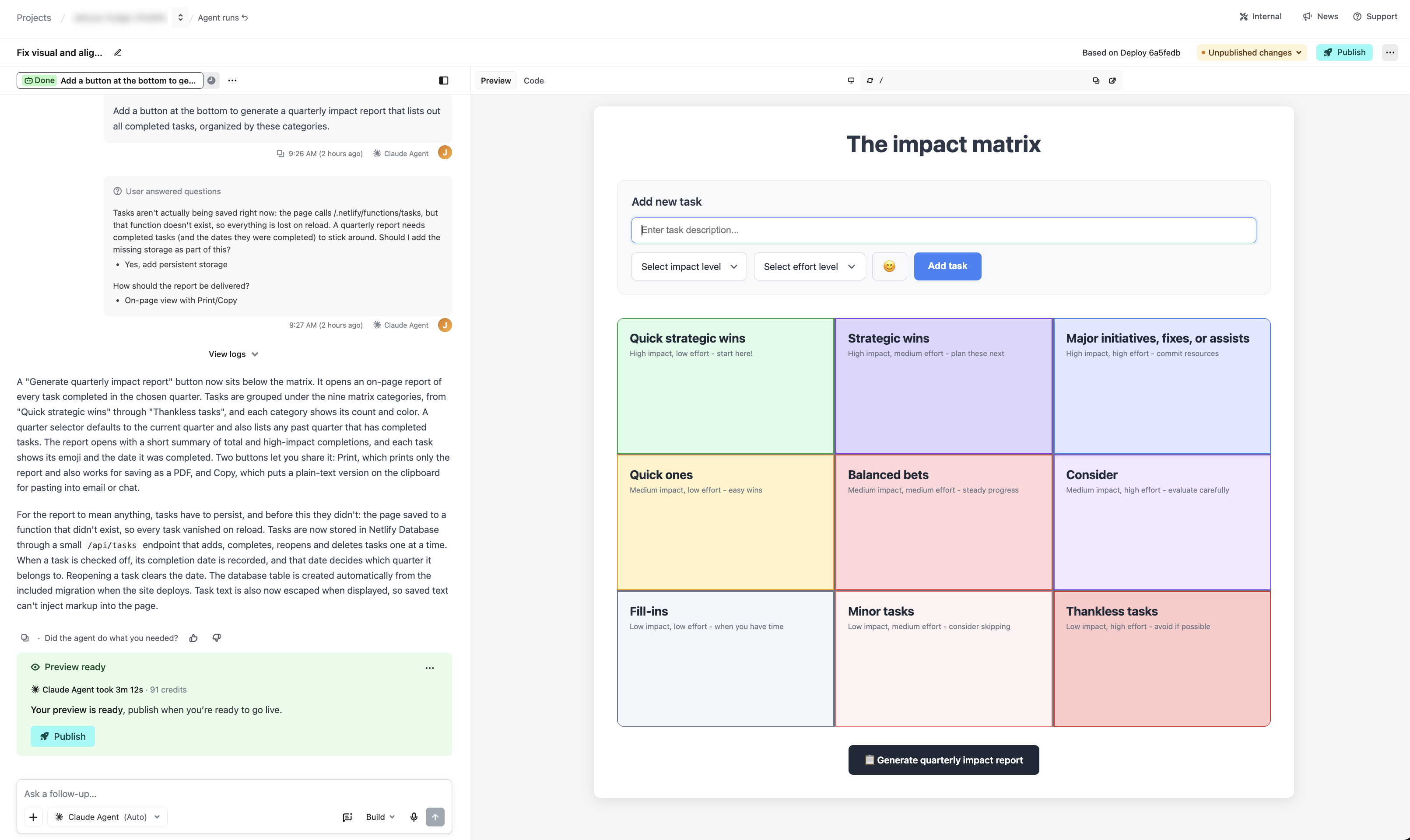
In this example, your agent on Netlify will also let you know if your project cannot save your tasks across browser sessions yet, and you can approve adding a database in the same view.
This is just one example of how Netlify gives you professional-grade capabilities, such as a real working database, with your agent of choice when you prompt with Agent Runners.
Try it out
See it in action when you start a new agent run or learn more about working with agents on Netlify.
-
Anthropic’s Claude Sonnet 5.5 model is now available through Netlify’s AI Gateway and Agent Runners with zero configuration required.
Use the Anthropic SDK directly in your Netlify Functions without managing API keys or authentication. AI Gateway handles everything automatically. Here’s an example using Claude Sonnet 5.5:
import Anthropic from '@anthropic-ai/sdk';export default async () => {const anthropic = new Anthropic();const response = await anthropic.messages.create({model: 'claude-sonnet-5-5',max_tokens: 4096,messages: [{role: 'user',content: 'How can AI improve my coding?'}]});return Response.json(response);};Claude Sonnet 5.5 is also available across Background Functions, Scheduled Functions, and Edge Functions. You get automatic access to Netlify’s caching, rate limiting, and authentication infrastructure.
Learn more in the AI Gateway documentation and Agent Runners documentation.
-
As part of our ongoing work to simplify the Netlify dashboard, we’ve added an activity feed to the project overview page. It’s available on all plans and adapts to how your project is set up.
Now when you open a project, the activity feed gives you a snapshot of your project’s latest updates, with quick access to:
- Production versions of your project, including the version last published
- Preview versions of your project
- Agent runs, so you can see what agents are working on and what you and your teammates have prompted
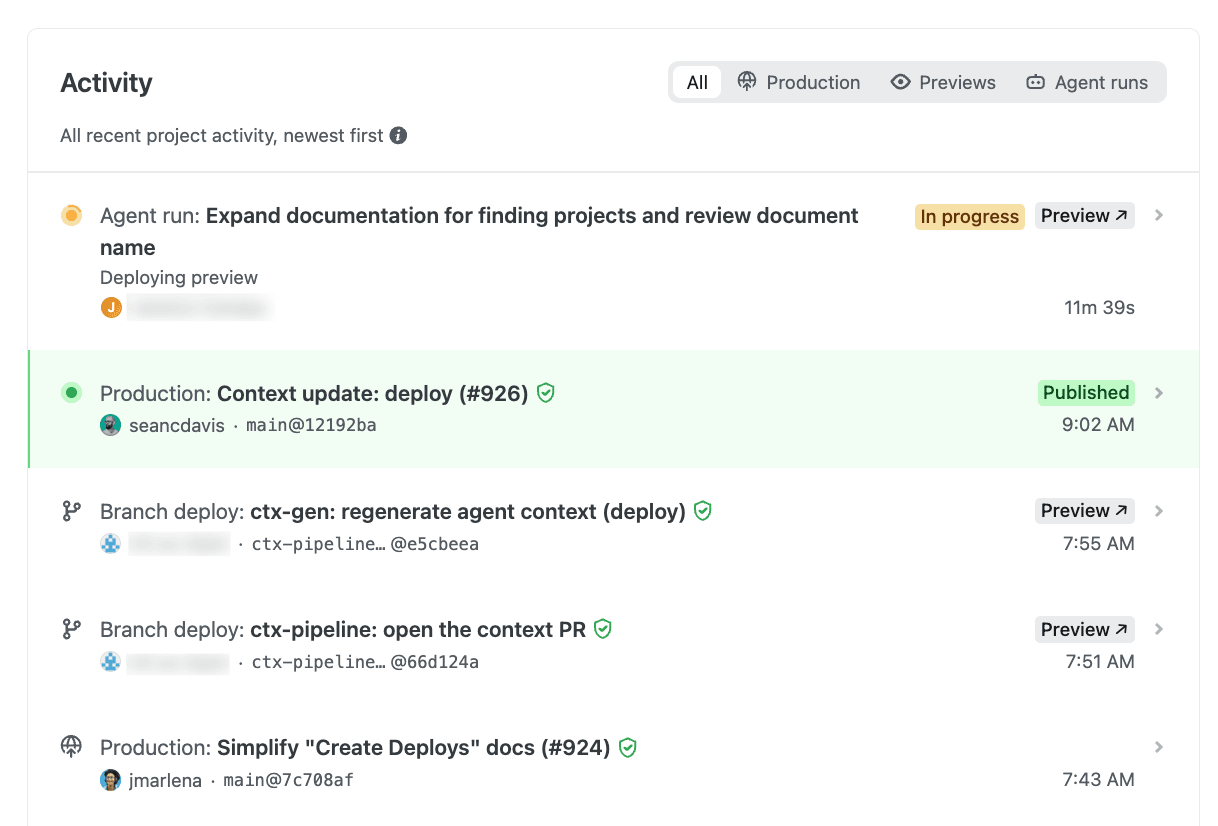
This means that instead of tracking down Production deploy links, Deploy Preview links, branch deploy links, and your agent runs list separately, you can now see where your project stands at a glance in one single spot.
The feed also suggests next steps to help you get started. It’s one of several dashboard improvements we’re gradually rolling out to simplify the Netlify experience, so you may have spotted a few already, with more to come.
-
The Next.js team has disclosed a critical severity vulnerability in an upstream dependency that can lead to remote code execution when
ImageResponserenders untrusted input. It is patched in 15.5.26 and 16.3.6. Applications that do not pass untrusted input intoImageResponseare not expected to be affected. Here’s what Netlify customers need to know.Vulnerabilities
- GHSA-vcvr-r3jv-pc5j / CVE-2026-94545 — Remote Code Execution in
next/ogImageResponse. Critical. Patched in 15.5.26 and 16.3.6.
Impact on Netlify
Netlify sites are affected only if they use
ImageResponseand the image it generates includes untrusted input — text, or an image loaded from the request. Sites that don’t useImageResponse, or that only render trusted content through it, are not affected.For sites that do, the impact is limited to a crashed function invocation, not code execution. On Netlify, this has minimal impact: our autoscaling serverless architecture means that a malicious request resulting in a crashed function does not affect other requests. However, active exploitation could increase your function costs.
What should I do?
We strongly recommend upgrading as soon as possible to patched releases:
next15.5.26 or later, or 16.3.6 or later, then redeploy.
Until you can upgrade, do not place untrusted input inside elements passed to
ImageResponse. Escape it as XML before rendering, or keep it out of the generated image entirely.Note that any publicly available deploy previews and branch deploys may remain vulnerable until they are automatically deleted. Consider deleting these deploys manually.
Resources
- GHSA-vcvr-r3jv-pc5j / CVE-2026-94545 — Remote Code Execution in
-
Anthropic’s Claude Opus 5.5 model is now available through Netlify’s AI Gateway and Agent Runners with zero configuration required.
Use the Anthropic SDK directly in your Netlify Functions without managing API keys or authentication. AI Gateway handles everything automatically. Here’s an example using Claude Opus 5.5:
import Anthropic from '@anthropic-ai/sdk';export default async () => {const anthropic = new Anthropic();const response = await anthropic.messages.create({model: 'claude-opus-5-5',max_tokens: 4096,output_config: { effort: 'medium' },messages: [{role: 'user',content: 'How can AI improve my coding?',},],});return new Response(JSON.stringify(response), {headers: { 'Content-Type': 'application/json' },});};Claude Opus 5.5 is also available across Background Functions, Scheduled Functions, and Edge Functions. You get automatic access to Netlify’s caching, rate limiting, and authentication infrastructure.
Learn more in the AI Gateway documentation and Agent Runners documentation.
-
OpenAI’s GPT-6 Sol and GPT-6 Luna models are now available through Netlify’s AI Gateway and Agent Runners with zero configuration required.
Use the OpenAI SDK directly in your Netlify Functions without managing API keys or authentication. AI Gateway handles everything automatically. Here’s an example using GPT-6 Sol with the Responses API:
import OpenAI from 'openai';export default async () => {const openai = new OpenAI();const response = await openai.responses.create({model: 'gpt-6-sol',input: 'Give a concise explanation of how AI works.',});return Response.json(response);};GPT-6 Sol and GPT-6 Luna are also available across Scheduled Functions, Background Functions, and Edge Functions. You get automatic access to Netlify’s caching, rate limiting, and authentication infrastructure.
Learn more in the AI Gateway documentation and Agent Runners documentation.