Posts tagged "AI"
-
You can now subscribe to Netlify events from ChatGPT and set up automations that respond to what’s happening on your sites.
Instead of checking the Netlify dashboard or waiting on an email, you can have ChatGPT act as soon as something happens. Events you can subscribe to include:
- A deploy succeeded
- A build failed
- A form submission came in
For more events to subscribe to, check out our deploy events.
Combine events with Netlify plugin and MCP server
Events get more useful when you pair them with everything else you can already do through the Netlify ChatGPT plugin and Netlify MCP server. For example, you could set up an automation that:
- Reviews new form submissions and flags the ones that need a follow-up
- Summarizes what changed when a production deploy succeeds
Because these automations live in ChatGPT, you can describe what you want in plain language and adjust it as your workflow changes.
Get started
Connect Netlify in ChatGPT, then ask it to subscribe to the events you care about for your project. Learn more in our guide to using Netlify with ChatGPT.
-
OpenAI’s Decisions API is now available through Netlify’s AI Gateway with zero configuration required.
Use the OpenAI SDK directly in your Netlify Functions to classify, route, and score inputs without managing API keys. Instead of generating prose, the Decisions API answers questions you define about an input, and
choiceanswers are always one of the options you declared. That means there’s no output to parse and nothing unexpected to handle before you branch on the result. The Decisions API is in beta and currently runs ongpt-6-luna.Here’s a Function for an online store that sorts incoming return requests by reason:
import type { Config } from "@netlify/functions";import OpenAI from "openai";export default async (req: Request) => {const openai = new OpenAI();const { answers } = await openai.decisions.create({model: "gpt-6-luna",input: await req.text(),questions: [{type: "choice",name: "reason",instructions: "Why is the customer returning this item?",choices: [{ value: "wrong_size" },{ value: "defective" },{ value: "not_as_described" },{ value: "changed_mind" },],},],});return Response.json(answers[0]);};export const config: Config = { path: "/api/returns", method: "POST" };Send it “The jacket fits well, but the zipper came off the second time I wore it” and you get back:
{"type": "choice","name": "reason","choice": "defective","probabilities": [{ "value": "wrong_size", "probability": 0.01 },{ "value": "defective", "probability": 0.95 },{ "value": "not_as_described", "probability": 0.03 },{ "value": "changed_mind", "probability": 0.01 }],"confidence": 0.93}choiceis safe to branch on directly, so you can send a prepaid label for defective items or offer an exchange for the wrong size, and useconfidenceto pass unclear requests to your support team.Learn more in the AI Gateway documentation and the OpenAI API reference.
-
You can now add comments to individual lines in the diff on the Code tab of Agent Runners, so you can give your agent precise feedback on the code it generated.
Previously, asking for a fix meant describing where the problem was in your prompt, such as naming the file, quoting the code, or explaining which function you meant.
Now you can pinpoint exactly where you want changes. Open the Code tab for an agent run, select the + next to a line in the diff, and leave a comment about what you want changed. Your comments are sent along with your next prompt, so the agent knows exactly which code lines you’re referring to.
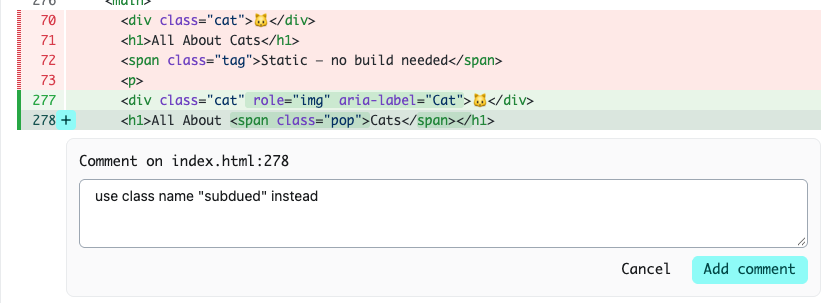
This makes follow-up prompts more useful when you want to:
- Correct a specific bug or edge case without rewriting the whole request
- Ask for a different approach in one part of a change while keeping the rest
- Flag naming, styling, or structure issues right where they appear
- Leave feedback on several spots across multiple files in a single follow-up run
Try it on your next agent run, or learn more about making changes with Agent Runners.
-
Every site created with Agent Runners now includes Open Graph tags. When you share a link to your site, it shows up as a proper preview instead of a bare URL.
Social media sites and messaging apps read Open Graph tags to build link previews. Now, when you or your visitors share a site you created with Agent Runners, the preview includes a screenshot of the site, its title, and a description. That makes your site easier to recognize, more inviting to click, and look better than ever from the moment you share it.
This is available on all public sites created with Agent Runners. You don’t need to do anything to turn it on.
Learn more about Agent Runners in the Agent Runners docs.
-
Agent Runners now shows you a preview right next to your prompt.
Previously, you’d get a link to the Deploy Preview and have to open it in a separate tab to see what the agent changed. Now the preview appears inline, so you can review the result and write your next prompt without switching back and forth. Plus, you can still access the Deploy Preview link if you need it.
This makes iterating with an agent feel more like a conversation. See what changed, spot what’s off, and follow up with the next instruction, all in one view.
Example flow
For example, say you’re building a strategic task organizer and prompt your agent to add a button that generates a quarterly impact report. Now you can watch your agent’s updates in the side preview next to your prompt.
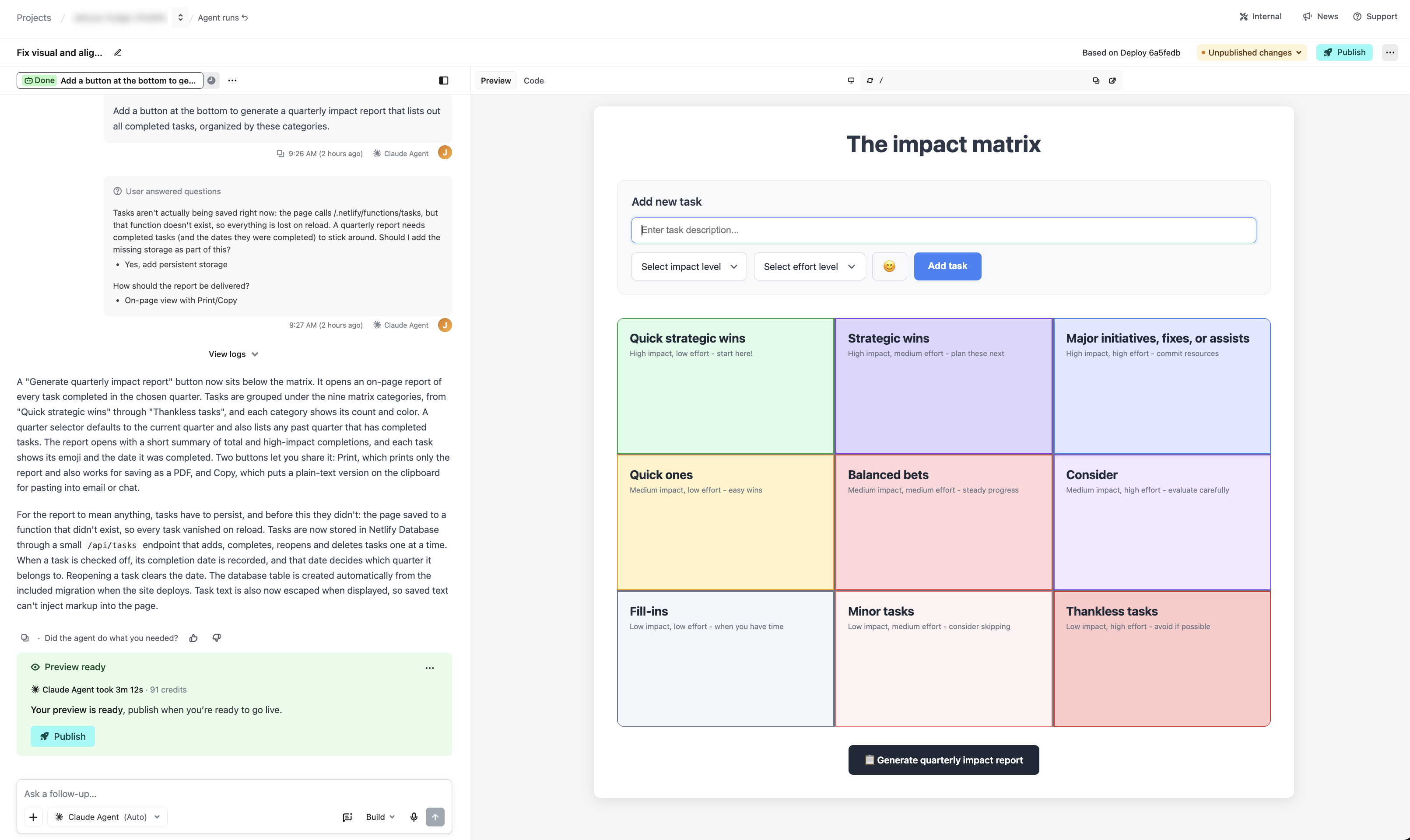
In this example, your agent on Netlify will also let you know if your project cannot save your tasks across browser sessions yet, and you can approve adding a database in the same view.
This is just one example of how Netlify gives you professional-grade capabilities, such as a real working database, with your agent of choice when you prompt with Agent Runners.
Try it out
See it in action when you start a new agent run or learn more about working with agents on Netlify.
-
TypeSafe’s Jev model is now available through Netlify’s AI Gateway with zero configuration required.
Install
@typesafe-ai/sdkand use it directly in your Netlify Functions — no API keys to create, no provider config, no base URLs to wire up. AI Gateway handles credentials automatically, and usage is billed to your Netlify credits like every other model in the gateway.Jev is TypeSafe’s first “System One” model, and it works differently from the chat models you’re used to. Instead of generating prose, you send it your program state along with a set of typed questions, and it returns typed answers with calibrated probabilities. There are three question primitives:
choicepicks one option from a set,scorerates against ordered levels, andnoulreturns a yes/no probability between 0 and 1. Answers are constrained to the options you declare, so there’s no JSON parsing or schema coercion on your end.Every question in a request is evaluated in parallel against the same state, which means batching a dozen questions into one call costs little more than asking one. State and questions share a budget of roughly 32,000 tokens — about 150,000 characters of English text — and TypeSafe reports end-to-end response times of 70–500ms, making Jev a good fit for classification, routing, extraction, scoring, and guardrail checks on the request path. The SDK defaults to the
jev-latestalias, currentlyjev-1.13.0, and requires Node.js 20 or newer.Here’s a Function that routes an incoming contact form submission to sales, support, or spam:
import type { Config, Context } from "@netlify/functions";import { choice, TypeSafeClient } from "@typesafe-ai/sdk";export default async (req: Request, context: Context) => {const client = new TypeSafeClient();const { answers } = await client.systemOne({state: await req.json(),questions: {team: choice("Route this contact form submission", {sales: null,support: null,spam: null,}),},});return Response.json({team: answers.team.choice,requestId: context.requestId,});};export const config: Config = { path: "/api/route", method: "POST" };The
choicehelper declares the three possible destinations up front, soanswers.team.choicecomes back as one of them and nothing else, which makes the response safe to branch on directly. Each answer also carries a probability distribution and a confidence value, so you can act on high-confidence decisions and escalate the rest to a human.Learn more in the AI Gateway documentation and the TypeSafe documentation.
-
DeepSeek V4.1 Flash is now available through OpenRouter on Netlify’s AI Gateway with zero configuration required.
Use the OpenRouter SDK directly in your Netlify Functions without managing API keys or authentication. AI Gateway handles everything automatically. Here’s an example using DeepSeek V4.1 Flash:
import { OpenRouter } from '@openrouter/sdk';export default async () => {const client = new OpenRouter();const response = await client.chat.send({chatRequest: {model: 'deepseek/deepseek-v4.1-flash',messages: [{ role: 'user', content: 'How can AI improve my coding?' }],maxTokens: 400,},});return Response.json(response);};DeepSeek V4.1 Flash is available across Background Functions, Scheduled Functions, and Edge Functions. You get automatic access to Netlify’s rate limiting and authentication infrastructure.
Learn more in the AI Gateway documentation and OpenRouter documentation.
-
Agent Runners are now better at completing their work when a run has less credits remaining than the task requires.
If you are close to running our of credits during a run, the agent will start focusing on delivering the most useful result it can with the credits it has left. It finishes work already in progress, leaves the project in a working state, and provides a clear summary of what it completed.
Previously, an ambitious task could end abruptly before the agent wrapped up, leaving partial changes and little explanation. Now, you’re more likely to get a working result you can use right away, or a solid, clearly documented starting point for your next run.
This improvement applies automatically to every agent and model available in Agent Runners. There’s nothing to enable or configure. Learn more in Make changes with Agent Runners and how credits work.
-
Agent Runners can now ask you clarifying questions before they start building. When a few details could significantly improve the result, the agent pauses and asks instead of guessing.
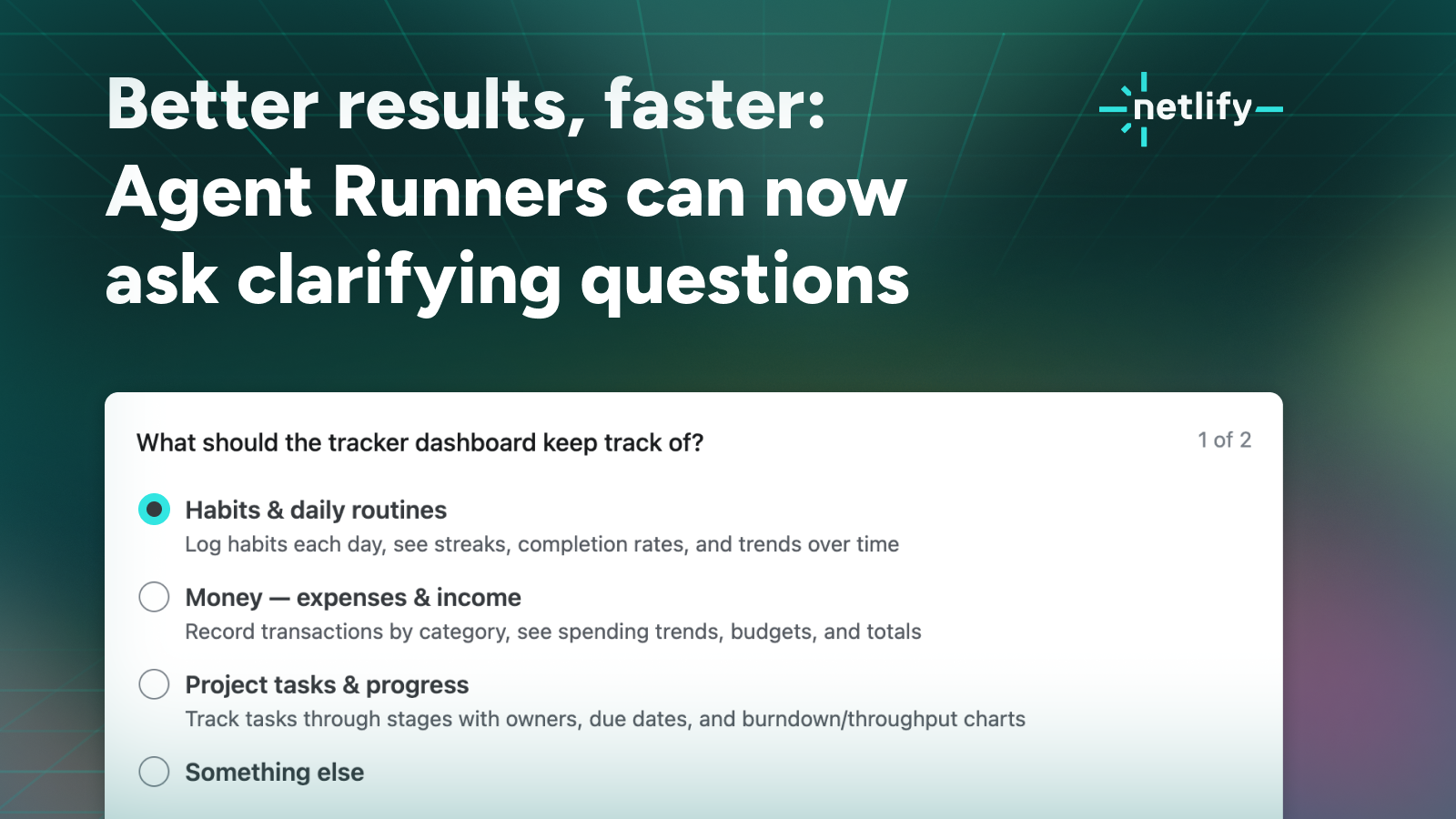
How clarifying questions work
Say you start with something broad, like “Build a tracker dashboard.” Previously the agent had to make every call for you: what the dashboard should track, whether entries should be editable and saved to a database or live in the code as a read-only placeholder, whether the look should be dark and high-contrast or light, clean, and editorial. Now it can ask, and you can answer directly where the agent run works.
Answer, skip, or add your own context
Answering questions is always optional so you can answer the ones you have opinions about and skip the rest. Or you can skip all questions and let the agent decide. Finally, you can always add context in your own words alongside your answers.
In our testing, even a few quick answers make the first build noticeably sharper and saves credits you’d otherwise spend on course corrections.
Once you answer, the run continues as usual: the agent writes the code, works with Netlify’s platform features, and creates a Deploy Preview you can review and iterate on.
Learn more
Clarifying questions work with every agent and model available in Agent Runners.
Try it out and see how to use Agent Runners in our docs.