Posts tagged “CLI”
New features, fixes and improvements to Netlify, as they ship.
-
Starting in version 27.18.0, Netlify CLI stores authentication tokens encrypted at rest in your operating system’s native secure keychain rather than in plain text on disk. This update protects your account credentials across macOS, Windows, and supported Linux distributions.
Previously, Netlify CLI saved login tokens in plain text in a local configuration file (such as
~/Library/Preferences/netlify/config.jsonon macOS). Because these tokens grant full access to manage your Netlify account and projects, plain text storage left them exposed to any malicious script or local process with disk read access. Storing tokens directly in your device’s secure credential store mitigates that risk and limits the blast radius of local machine breaches or prompt injection attacks.How it works
Netlify CLI now integrates directly with platform-native credential managers:
- macOS: Keychain
- Windows: Windows Credential Manager
- Linux: Secret Service API (standard on GNOME and KDE, and configurable elsewhere)
When you run
netlify login, new tokens are automatically saved to the OS keychain. Depending on your system settings, your device may occasionally ask for biometric authorization (such as Touch ID or fingerprint) or your password when the CLI accesses your credentials.Migrating your token

When an existing plain text token is detected during an interactive command, Netlify CLI prompts you to migrate to keychain storage. Approving the prompt initiates a login refresh, saves your token securely to the keychain, and removes the legacy plain text file entry. If you decline, your choice is remembered so you aren’t nagged again. You can also trigger the migration at any time by running
netlify login --new.If keychain storage is unavailable on your system or writes fail, Netlify CLI automatically falls back to plain text storage. To verify where your active token is stored, run
netlify status. You can also setNETLIFY_USE_LEGACY_AUTH_STORAGE=1to disable keychain storage if required in your environment.What you need to do
To update your Netlify CLI to the latest version, run:
npm install -g netlify-cli@latestThe next time you run an interactive command requiring authentication, press Enter at the prompt to migrate your token to your system’s keychain, or run
netlify login --newto migrate immediately.When updating, keep the following in mind:
- Multiple global CLI installs: If you have multiple global installs of Netlify CLI across different Node managers (such as
nvm,pnpm, or Homebrew), update all of them so an older version doesn’t revert your credentials back to plain text storage. - Local Netlify MCP: If you use the local Netlify Model Context Protocol (MCP) server, ensure you have
@netlify/mcpversion 1.22.1 or later to support keychain-stored credentials.
Learn more about managing your credentials in the Netlify CLI documentation or view the changes in the Netlify CLI repository.
-
The Netlify CLI now includes a
netlify logscommand, giving you a powerful and flexible way to access logs for your projects whether you’re a developer debugging locally or an AI agent processing structured output.Filter by source
Use
--sourceto pull logs from functions, edge functions, deploys, or any combination of them together. Color-coded output makes it easy to tell sources apart at a glance when you’re tailing multiple at once.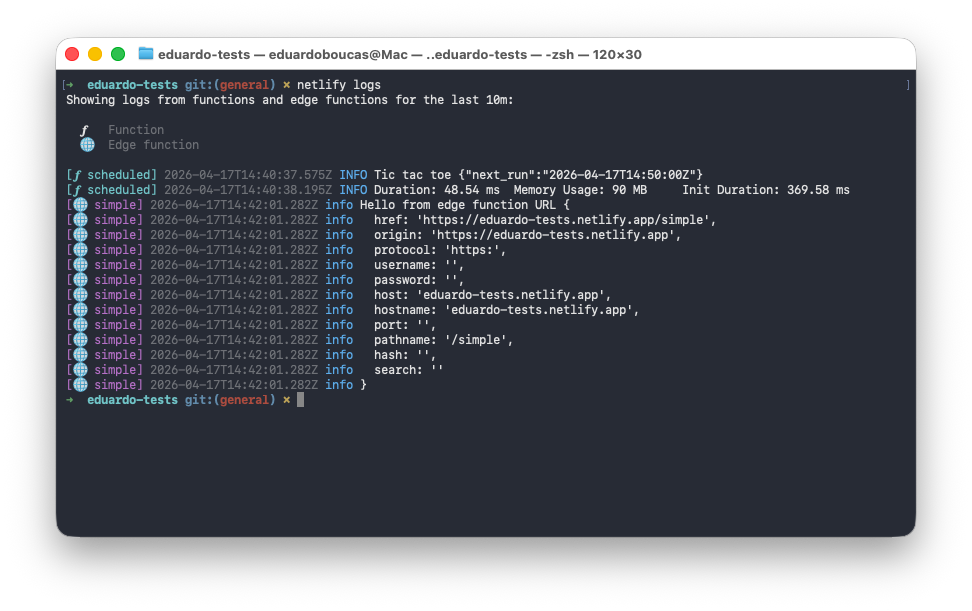
Need to narrow it down further? The
--functionand--edge-functionflags let you filter to a specific function by name, and--urllets you target the exact deploy you want logs from.Historical and real-time views
The
--sinceand--untilflags let you query logs over any specific time window — useful for tracking down what happened during a past deploy or incident. When you want to watch logs as they come in,--followstreams them in real time.JSON Lines support
Pass
--jsonto get structured output in JSON Lines format. This works in both historical and real-time modes, makingnetlify logseasy to pipe into your own tooling or integrate into automated workflows.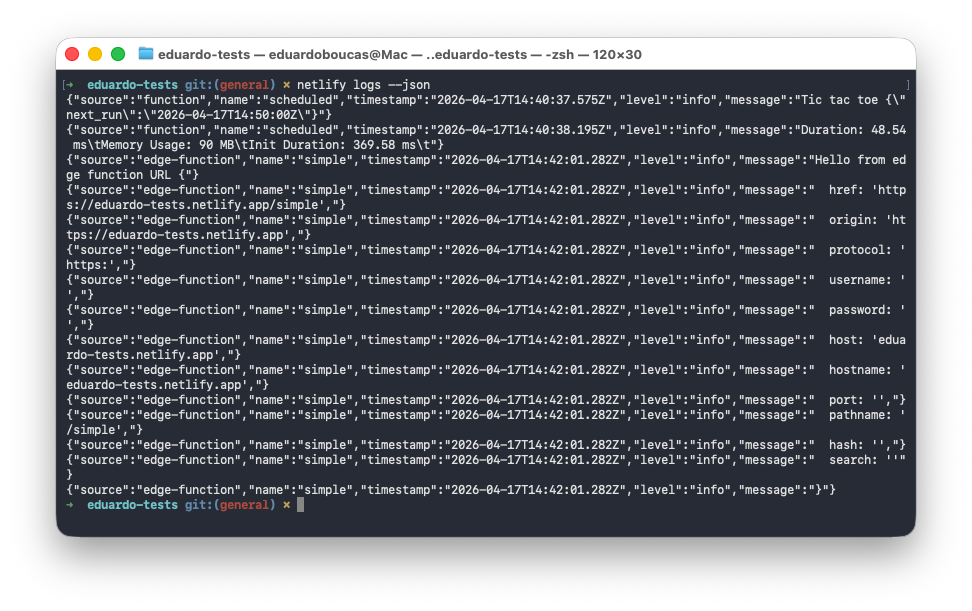
Update to the latest Netlify CLI to start using it:
npm install -g netlify-cli@latestThen run
netlify logs --helpto see all available options. -
We’ve improved the Netlify CLI’s Agent Experience to make it the fastest way for both developers and AI agents to go from idea to deployed site. Here’s what’s new.
Create a new project from a prompt
The
netlify createcommand now builds you a new site from scratch, triggering Agent Runners:netlify create "a landing page for a SaaS product with a waitlist signup"This single command will:
- Create a new Netlify project for you
- Deploy it to a live URL
- Pull down the code so you can start iterating locally
Prefer to build with GitHub? The Netlify CLI can also create a new GitHub repo and automatically hook it up to your new Netlify project, no manual setup required.
Deploy without an account
Need to spin up something quick without creating an account first or signing in? The new
--allow-anonymousflag lets you deploy without a Netlify account:netlify deploy --allow-anonymousThis will create the project, deploy it to a live URL, and let you claim the project within an hour. This is especially useful for AI agents that need to create temporary projects without requiring Netlify credentials upfront.
Better agent experience throughout
We’ve resolved the major issues agents commonly hit with the CLI. The CLI is now a more predictable integration point whether you’re building with an AI coding assistant or orchestrating your own agents.
Install or update the Netlify CLI to try it out:
npm install -g netlify-cli@latest -
23.12.3 (2025-12-04)
Bug Fixes
deps: update dependency @netlify/ai to v0.3.4 (#7812) (6d4de26)
include sourceZipFileName in results for printing results if available (#7814) (6c83dfe)
-
23.12.2 (2025-11-28)
Bug Fixes
deps: upgrade deps to resolve 2 high-sev vulnerabilities (#7804) (1c41700)
-
23.12.1 (2025-11-26)
Bug Fixes
fix EBADPLATFORM when running npm ci (c0268cb)
-
23.12.0 (2025-11-25)
Features
support skew protection token (#7796) (64c3c72)
Bug Fixes
deps: update dependency @netlify/ai to v0.3.3 (#7739) (8f3c275)
deps: update dependency @netlify/build to v35.5.2 (#7795) (f027183)
deps: update dependency @netlify/dev-utils to v4.3.2 (#7781) (5ea0ce9)
deps: update dependency @netlify/edge-functions to v3.0.2 (#7782) (bca0b2f)
deps: update dependency @netlify/functions to v5 (#7726) (b4e3777)
deps: update netlify packages (#7783) (31cf4a3)
deps: update netlify packages (#7786) (a17ff10)
deps: update netlify packages (#7790) (a264676)
deps: update netlify packages (#7792) (95c9daa)
-
23.11.1 (2025-11-18)
Bug Fixes
handle ECONNRESET errors in Node.js 24.x (#7772) (03de2a0)
-
23.12.0-rc.0