Changelog
-
On private projects and sites protected with Netlify team login, your Netlify Functions and Edge Functions can now see who is making the request. The signed-in Netlify user is available as
context.user, with their user ID, email address, and when their access expires.This function returns the signed-in user’s ID, email address, and access expiry as JSON at
/whoami, and responds with a401whencontext.userisn’t set:netlify/functions/whoami.ts import type { Config, Context } from '@netlify/functions'export default async (req: Request, context: Context) => {if (!context.user) {return new Response('Unauthorized', { status: 401 })}return Response.json({id: context.user.id,email: context.user.email,expiresAt: context.user.expiresAt.toISOString(),})}export const config: Config = { path: '/whoami' }Previously, protecting a site meant Netlify checked who could visit, but your code couldn’t tell who they were. Knowing who’s on the other end meant adding a second login of your own on top.
Now Netlify verifies the visitor at the edge and passes their identity to your code. Because
context.usercomes from Netlify and not from the request, a visitor can’t impersonate someone else by sending their own headers.With
context.user, you can build on the login your team already uses. Examples like:- Internal dashboards and admin tools that show each person their own data
- Audit logs that record who made a change or triggered an action
- Approval and review workflows that know who approved what
- Per-person settings, permissions, or feature access inside an internal app
Learn more in the Netlify documentation:
-
You can now subscribe to Netlify events from ChatGPT and set up automations that respond to what’s happening on your sites.
Instead of checking the Netlify dashboard or waiting on an email, you can have ChatGPT act as soon as something happens. Events you can subscribe to include:
- A deploy succeeded
- A build failed
- A form submission came in
For more events to subscribe to, check out our deploy events.
Combine events with Netlify plugin and MCP server
Events get more useful when you pair them with everything else you can already do through the Netlify ChatGPT plugin and Netlify MCP server. For example, you could set up an automation that:
- Reviews new form submissions and flags the ones that need a follow-up
- Summarizes what changed when a production deploy succeeds
Because these automations live in ChatGPT, you can describe what you want in plain language and adjust it as your workflow changes.
Get started
Connect Netlify in ChatGPT, then ask it to subscribe to the events you care about for your project. Learn more in our guide to using Netlify with ChatGPT.
-
Anthropic’s Claude Haiku 5.5 model is now available through Netlify’s AI Gateway and Agent Runners with zero configuration required.
Use the Anthropic SDK directly in your Netlify Functions without managing API keys or authentication. AI Gateway handles everything automatically. Here’s an example using Claude Haiku 5.5 with the Messages API:
import Anthropic from '@anthropic-ai/sdk';export default async () => {const anthropic = new Anthropic();const response = await anthropic.messages.create({model: 'claude-haiku-5-5',max_tokens: 1024,messages: [{ role: 'user', content: 'Give a concise explanation of how AI works.' }],});return Response.json(response);};Claude Haiku 5.5 is also available across Scheduled Functions, Background Functions, and Edge Functions. You get automatic access to Netlify’s caching, rate limiting, and authentication infrastructure.
Learn more in the AI Gateway documentation and Agent Runners documentation.
-
OpenAI’s Decisions API is now available through Netlify’s AI Gateway with zero configuration required.
Use the OpenAI SDK directly in your Netlify Functions to classify, route, and score inputs without managing API keys. Instead of generating prose, the Decisions API answers questions you define about an input, and
choiceanswers are always one of the options you declared. That means there’s no output to parse and nothing unexpected to handle before you branch on the result. The Decisions API is in beta and currently runs ongpt-6-luna.Here’s a Function for an online store that sorts incoming return requests by reason:
import type { Config } from "@netlify/functions";import OpenAI from "openai";export default async (req: Request) => {const openai = new OpenAI();const { answers } = await openai.decisions.create({model: "gpt-6-luna",input: await req.text(),questions: [{type: "choice",name: "reason",instructions: "Why is the customer returning this item?",choices: [{ value: "wrong_size" },{ value: "defective" },{ value: "not_as_described" },{ value: "changed_mind" },],},],});return Response.json(answers[0]);};export const config: Config = { path: "/api/returns", method: "POST" };Send it “The jacket fits well, but the zipper came off the second time I wore it” and you get back:
{"type": "choice","name": "reason","choice": "defective","probabilities": [{ "value": "wrong_size", "probability": 0.01 },{ "value": "defective", "probability": 0.95 },{ "value": "not_as_described", "probability": 0.03 },{ "value": "changed_mind", "probability": 0.01 }],"confidence": 0.93}choiceis safe to branch on directly, so you can send a prepaid label for defective items or offer an exchange for the wrong size, and useconfidenceto pass unclear requests to your support team.Learn more in the AI Gateway documentation and the OpenAI API reference.
-
You can now add comments to individual lines in the diff on the Code tab of Agent Runners, so you can give your agent precise feedback on the code it generated.
Previously, asking for a fix meant describing where the problem was in your prompt, such as naming the file, quoting the code, or explaining which function you meant.
Now you can pinpoint exactly where you want changes. Open the Code tab for an agent run, select the + next to a line in the diff, and leave a comment about what you want changed. Your comments are sent along with your next prompt, so the agent knows exactly which code lines you’re referring to.
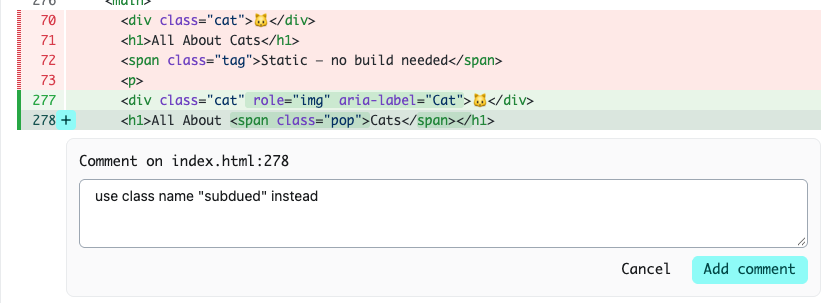
This makes follow-up prompts more useful when you want to:
- Correct a specific bug or edge case without rewriting the whole request
- Ask for a different approach in one part of a change while keeping the rest
- Flag naming, styling, or structure issues right where they appear
- Leave feedback on several spots across multiple files in a single follow-up run
Try it on your next agent run, or learn more about making changes with Agent Runners.
-
Google’s Gemini Nano Banana 2.1 is now available through Netlify AI Gateway. You can call this image generation model from Netlify Functions without configuring API keys; AI Gateway provides the connection to Google for you.
Use the Google Gen AI SDK with the model ID
gemini-nano-banana-2.1. Here’s an example that generates an image from a prompt and returns it directly from a Function:import { GoogleGenAI } from '@google/genai';// Netlify Function: Generate an image with Gemini Nano Banana 2.1 and return it directly.// Usage (GET): /.netlify/functions/nano-banana-2-1?prompt=Your+prompt+here// Returns: binary image (PNG/JPEG/etc) with proper content-type. If no image, JSON error.export default async (request: Request) => {const url = new URL(request.url);const prompt = url.searchParams.get('prompt') || 'two happy bananas holding flashlights';const ai = new GoogleGenAI({});try {const response = await ai.models.generateContent({model: 'gemini-nano-banana-2.1',contents: prompt,config: {imageConfig: {aspectRatio: '16:9',imageSize: '1K'}}});let imagePart = null;for (const part of response.candidates[0].content.parts) {if (part.inlineData) {imagePart = part.inlineData;break;}}const bytes = Buffer.from(imagePart.data, 'base64');const mimeType = imagePart.mimeType || 'image/png';return new Response(bytes, {status: 200,headers: {'Content-Type': mimeType,'Cache-Control': 'no-store'}});} catch (err) {return new Response(JSON.stringify({ error: String(err), prompt }), {status: 500,headers: { 'Content-Type': 'application/json' }});}};Gemini Nano Banana 2.1 is also available across Scheduled Functions, Background Functions, and Edge Functions. You get automatic access to Netlify’s caching, rate limiting, and authentication infrastructure.
Learn more in the AI Gateway documentation.
-
SvelteKit 3 is out today, and it just works on Netlify on day one. To upgrade, run:
npx sv migrate sveltekit-3The migration tool handles most of the mechanical changes for you, including moving your config and updating imports. You can also check out the official migration guide.
What’s new
Some highlights include:
- Vite 8 — SvelteKit 3 requires Vite 8, bringing faster builds powered by Rolldown.
- Config lives in
vite.config.ts— SvelteKit configuration moves out ofsvelte.config.jsand into your Vite config, so Vite plugins can read it right away. - Explicit environment variables are stable — Declare the environment variables your app depends on in
src/env.ts, and specify whether each one is public and whether it’s resolved at build time or when the app boots. You get validation and type safety out of the box. $libis now#lib— The$libalias is replaced by#lib, using Node’s subpath imports. Imports need to be unambiguous, so write#lib/foo.tsor#lib/foo/index.ts.- Shallow routing is built into
goto— Usegoto()withshallow: trueinstead ofpushStateandreplaceState. - Consistent error handling — All errors, including ones you throw with
error(...), now go through yourhandleErrorhook. - New service worker modules —
$service-workeris replaced by imports from$app/env,$app/paths, and$app/manifest, with better type checking in service workers. - Tracing is stable — Tracing support has moved out of the experimental namespace.
Check the full migration guide for all the details.
Watch out for the
#libaliasNearly every SvelteKit project imports from
$lib, so this is the change you’re most likely to run into. The migration tool rewrites these imports for you, but because#librelies on Node’s subpath imports, directory imports without an explicit file no longer resolve:// Beforeimport { formatDate } from '$lib/utils';// Afterimport { formatDate } from '#lib/utils/index.ts';If a build fails after upgrading with a module resolution error, look for
#libimports that point to a directory or leave off the file extension.Deploy a SvelteKit 3 site on Netlify
If you want to get started with a new site, start with the SvelteKit on Netlify doc, or just click this button:

-
The Next.js team has disclosed seven security vulnerabilities in Next.js (one high, five medium, one low), patched on September 30, 2026 in 15.5.27 and 16.3.8. The issues span server-side request forgery (SSRF), cache poisoning, and information disclosure. Several of them do not affect apps hosted on Netlify. Here’s what Netlify customers need to know.
Summary
Some of these vulnerabilities affect Next.js sites hosted on Netlify (details in Impact on Netlify), so if you run Next.js on Netlify, we strongly recommend upgrading
nextto 15.5.27 or 16.3.8 and redeploying. The OpenNext Netlify Next.js adapter must also be updated to@netlify/plugin-nextjs5.16.1; it’s auto-installed by default, so a redeploy picks it up (a manual upgrade is only needed if you pin the version). See What should I do? for full steps.Vulnerabilities
All issues are patched in 15.5.27 and 16.3.8.
Vulnerability Severity Affected GHSA-cjq9-62q9-8jv4 / CVE-2026-94483 — Image optimizer SSRF High 16.x with an attacker-controlled remote host in images.remotePatternsGHSA-4jqv-mc3x-m676 / CVE-2026-94543 — Cache poisoning of SSG/ISR pages (cross-route) Medium 15.x/16.x Pages Router apps with SSG/ISR and a root catch-all route GHSA-mcj8-r9mp-w47p / CVE-2026-94484 — Cache poisoning via encoded paths / /index(SSG/ISR)Medium 15.x/16.x apps combining a root catch-all with SSG/ISR routes GHSA-f87g-xv8r-7p7x / CVE-2026-94485 — Metadata image dynamicParamsbypass (information disclosure)Medium 16.x App Router Webpack builds using metadata image routes GHSA-h694-7cp9-m8p3 — Cache leak across root param values in nested use cacheMedium 16.3.x with Cache Components + nested use cachereading root paramsGHSA-3w37-wq28-93x7 / CVE-2026-94544 — Draft Mode use cachecontent leakMedium 16.3.x with Cache Components / useCache, Draft Mode, and draft-dependent cached contentGHSA-39w2-rjm5-chcv / CVE-2026-94486 — Development MCP information disclosure Low 16.x development servers ( next dev) with the MCP endpointImpact on Netlify
Not affected on Netlify
- GHSA-cjq9-62q9-8jv4 (Image optimizer SSRF): Netlify projects are not affected. Image optimization on Netlify is handled by Netlify Image CDN — a separate service outside your project’s functions — so the vulnerable Next.js image-optimizer code path is not used, and the Image CDN has its own protections against this class of SSRF.
- GHSA-3w37-wq28-93x7 (Draft Mode
use cachecontent leak): Netlify projects are not affected. This leak requires two requests to share a single server process’s in-flight cache fill. On Netlify’s serverless architecture each request is served by its own isolated invocation, so the required overlap cannot occur. - GHSA-39w2-rjm5-chcv (Development MCP information disclosure): Netlify projects are not affected. This affects the
next devdevelopment server only; Netlify serves production builds, which do not expose the development MCP endpoint.
Information disclosure
GHSA-f87g-xv8r-7p7x (Metadata image
dynamicParamsbypass) can expose content from routes excluded viadynamicParamsthrough metadata image routes. It only affects Webpack builds; Turbopack builds are not affected. On Netlify, apps that use a Webpack build are affected; upgrading Next.js resolves it.Cache poisoning and availability
GHSA-4jqv-mc3x-m676 and GHSA-mcj8-r9mp-w47p affect apps with SSG/ISR routes behind a root catch-all.
- GHSA-4jqv-mc3x-m676 (cross-route cache poisoning): Pages Router apps with SSG/ISR and a root catch-all route are affected on Netlify. Upgrading Next.js resolves the poisoning on its own. The fix also changes how cache entries are keyed, so you should update the Netlify adapter (5.16.1) as well — otherwise prerendered pages miss the cache and re-render (a serving/performance regression, not a security one). See What should I do?.
- GHSA-mcj8-r9mp-w47p (encoded paths /
/index): App Router apps with a prerendered catch-all route are affected by an availability issue — certain valid percent-encoded URLs can return an error (HTTP 500) instead of the page. Upgrading Next.js resolves it. - GHSA-h694-7cp9-m8p3 (cache leak across root param values): affects Next.js 16.x apps using Cache Components with a nested
use cachethat reads root params (e.g. locale or region segments) — an enclosing cache entry can be keyed without the root param and reused across values, so content produced for one value can be served for another. Upgrading Next.js resolves it.
What should I do?
We strongly recommend upgrading as soon as possible:
- Upgrade
nextto 15.5.27 or 16.3.8 and redeploy.
The OpenNext Netlify Next.js adapter that runs your app must also be updated to v5.16.1:
- Auto-installed adapter (default): redeploy — the update is applied automatically.
- Manually installed adapter: upgrade
@netlify/plugin-nextjsto v5.16.1 and redeploy. We recommend not pinning the adapter version so future fixes ship automatically.
Note that any publicly available deploy previews and branch deploys may remain vulnerable until they are automatically deleted. Consider deleting these deploys manually.
Resources
-
The TanStack team has disclosed a critical cross-site scripting (XSS) vulnerability in TanStack Start. A crafted URL can cause an affected app to return attacker-controlled HTML from its own origin, which may run attacker-supplied JavaScript in a visitor’s browser. Here’s what Netlify customers need to know.
Vulnerabilities
GHSA-qx66-fv34-fjm8 (CVE-2026-102989): Unauthenticated reflected XSS in server-function responses.
Package Affected versions Fixed in @tanstack/react-start>= 1.143.12, < 1.168.60 1.168.60 @tanstack/solid-start>= 1.143.12, < 1.168.57 1.168.57 @tanstack/vue-start>= 1.143.12, < 1.168.56 1.168.56 @tanstack/start-server-core>= 1.143.12, < 1.169.39 1.169.39 Impact on Netlify
This is a client-side cross-site scripting (XSS) vulnerability in TanStack Start’s server-function response handling. Because the malicious response is returned from the app’s own origin, an attacker who gets a victim to open a crafted link can run JavaScript in that visitor’s session — for example, to read their data or act as them on the site. All applications on an affected version should upgrade.
What should I do?
We strongly recommend upgrading as soon as possible to the patched releases:
@tanstack/react-start1.168.60 or later@tanstack/solid-start1.168.57 or later@tanstack/vue-start1.168.56 or later@tanstack/start-server-core1.169.39 or later
Not sure if you’re affected?
Open your project in Agent Runners in ask mode and try this prompt:
Does this project use TanStack Start? If so, which versions of `@tanstack/react-start`, `@tanstack/solid-start`, `@tanstack/vue-start`, and `@tanstack/start-server-core` are resolved in the lockfile? Is the resolved `@tanstack/start-server-core` version 1.169.39 or later? If not, what do I need to change to upgrade? (Advisory: GHSA-qx66-fv34-fjm8)Ask mode answers without changing your code. If an upgrade is needed, switch to Build mode to make the change, preview, and redeploy.
Deploy previews and branch deploys
Note that any publicly available deploy previews and branch deploys may remain vulnerable until they are automatically deleted. Consider deleting these deploys manually.
Resources